Is LEGO Education Safe for Kids? Safety Score: B
@legoeducation · 41K subscribers · Graded August 2, 2026 · Based on 100 recent videos
@legoeducation · 41K subscribers · Graded August 2, 2026 · Based on 100 recent videos
Yes, I would let my child watch this channel, especially if they are interested in building, coding, or science, and with parental guidance to facilitate the learning activities.
Best for ages 6-14 years. Not recommended under age 5. Acceptable for 5-16 years.
The content is primarily designed for elementary and middle school students, with some concepts accessible to younger children and relevant for older teens.
| Dimension | Score | Headline |
|---|---|---|
| Content Appropriateness | 25/25 | Content is appropriate, focusing on educational concepts without concerning themes. |
| Shorts & Dopamine Factor | 15/25 | Moderate use of Shorts, balanced with longer educational content. |
| Age Clarity | 20/25 | Clear age targeting for elementary and middle school students. |
| Educational Value | 25/25 | High educational value, focusing on STEM and AI literacy. |
Content is appropriate, focusing on educational concepts without concerning themes.
The channel consistently presents content suitable for children, with no instances of violence, sexual themes, scary imagery, or manipulative clickbait. Videos like "Infinite Possibilities: Coding the Mona Lisa" and "LEGO® Education Computer Science & AI 'Bee-havior' Lesson Demo (Grades 3-5)" demonstrate a clear focus on constructive, educational topics.
Moderate use of Shorts, balanced with longer educational content.
With 43 Shorts out of the last 100 uploads, the channel has a moderate percentage of short-form content (43%). While some videos are short, many are longer lesson demos or keynotes, indicating a balance rather than a primary focus on rapid-fire, addictive scrolling.
Clear age targeting for elementary and middle school students.
The channel explicitly targets specific age groups in video titles and descriptions, such as "LEGO® Education Computer Science & AI 'Bee-havior' Lesson Demo (Grades 3-5)" and "LEGO® Education Science 6-8: 'Kinetic Kicker' lesson demo." This makes it easy for parents to identify content relevant to their child's developmental stage.
High educational value, focusing on STEM and AI literacy.
The channel offers active educational content with clear learning objectives, particularly in STEM fields. Videos like "Infinite Possibilities: Coding the Mona Lisa" and "LEGO® Education Computer Science & AI 'Strike a Pose' Lesson Demo (Grades 3-5)" teach concepts in computer science, AI, and robotics using hands-on LEGO builds.
This channel from LEGO Education focuses on providing educational content, primarily for elementary and middle school students, using LEGO bricks and robotics. It covers subjects like computer science, artificial intelligence, and general science through lesson demonstrations and teacher insights.
Parents should know that this channel is designed to support classroom learning and introduce STEM concepts in an engaging, hands-on way. The content is generally instructional and aims to build foundational skills rather than being purely for entertainment.
Yes, I would let my child watch this channel, especially if they are interested in building, coding, or science, and with parental guidance to facilitate the learning activities.
Watch these videos with your child and consider purchasing LEGO Education kits to replicate the hands-on learning experiences at home.
 Infinite Possibilities: Coding the Mona Lisa
— Positive
Infinite Possibilities: Coding the Mona Lisa
— Positive
This video showcases a creative application of coding with LEGO, demonstrating problem-solving and artistic expression.
 LEGO® Education Computer Science & AI "Bee-havior" Lesson Demo (Grades 3-5)
— Positive
LEGO® Education Computer Science & AI "Bee-havior" Lesson Demo (Grades 3-5)
— Positive
This is a clear lesson demonstration for a specific age group, teaching about sensors and programming in an accessible way.
 LEGO® Education Keynote | From Mystery to Mastery: Building AI Literacy Through Creativity
— Neutral
LEGO® Education Keynote | From Mystery to Mastery: Building AI Literacy Through Creativity
— Neutral
This longer video is a keynote address, more suited for educators or parents interested in the pedagogy behind the products rather than direct child consumption.
 We Trust in Kids: Student Voices in AI
— Positive
We Trust in Kids: Student Voices in AI
— Positive
This video highlights student perspectives on AI, promoting critical thinking and engagement with emerging technologies.
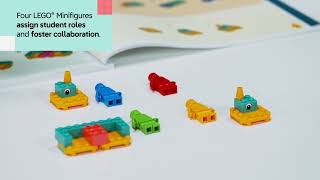 LEGO® Education Science K-2: "Hide the Seeds" lesson demo
— Positive
LEGO® Education Science K-2: "Hide the Seeds" lesson demo
— Positive
This lesson demo is specifically designed for younger children, introducing life science concepts in an age-appropriate manner.
VidCove's Channel Safety Grader analyzes the 100 most recent videos on LEGO Education using Google Gemini, scoring four independent dimensions on a 0–25 scale:
LEGO Education's Shorts ratio in this sample is 43% — roughly 43 of the 100 videos sampled were Shorts. Reports are regenerated when channel content changes materially or after 180 days have passed.
VidCove lets you approve every channel before your child sees it. No algorithm. No Shorts. No recommendations. Just the channels you trust. Free 7-day trial — no credit card required.