Hank Green’s ClockwiseTV vs VidCove
Who picks the videos, how the time limits work, and what your kids can watch on the family TV.
Choose VidCove if you want to keep the YouTube creators your kids already love and decide what each child can watch. You pick the channels, block Shorts, and set a daily screen-time budget that follows them to supported TVs. Hank Green’s ClockwiseTV offers a team-curated educational catalog for ages 8–12 with a timer set before each session.
I’m the founder of VidCove. This comparison draws on ClockwiseTV’s published help, pricing, and creator pages and VidCove’s current product documentation. I checked features and U.S. pricing on .
ClockwiseTV vs VidCove at a glance
Scroll across the table to see both apps.
| What to compare | VidCove | ClockwiseTV |
|---|---|---|
| Video library | YouTube channels you approve for each child. Premium Strict Mode allows individual video approval. | Educational videos selected and reviewed by ClockwiseTV’s team, designed for ages 8–12. |
| Screen time | Daily budget per child. Premium adds daily limits for individual channels and playlists. | Set an end time before each session. Browse and search only show videos that fit. |
| What kids can browse | Their approved library, with search, favorites, and a Shorts block parents can enable. | A small selection based on interests and time left, with catalog search and favorites. |
| Parent oversight | Per-child libraries, watch history, and optional channel requests. Premium adds reports and a weekly digest. | Parent PIN to start sessions, multiple child profiles, and watch history. |
| Video playback | Embedded YouTube videos. Creator sponsorships can be part of the original video. | Ad-free playback from ClockwiseTV’s own catalog. |
| Devices | iPhone, iPad, Android, web, and TV apps for Android TV, Google TV, Fire TV, and LG webOS. | iPhone, iPad, and Android phones and tablets. AirPlay mirroring from iOS. |
| U.S. pricing | Free plan with limits. Premium is $7.99/month or $79.99/year at standard rates. | $8.99/month or $89.99/year at standard rates. An in-app trial may be offered. |
Sources for the table are ClockwiseTV’s Help Center, ClockwiseTV pricing, and VidCove pricing and features. Check each app’s checkout for the price and offer available to you.
How VidCove gives parents control over YouTube
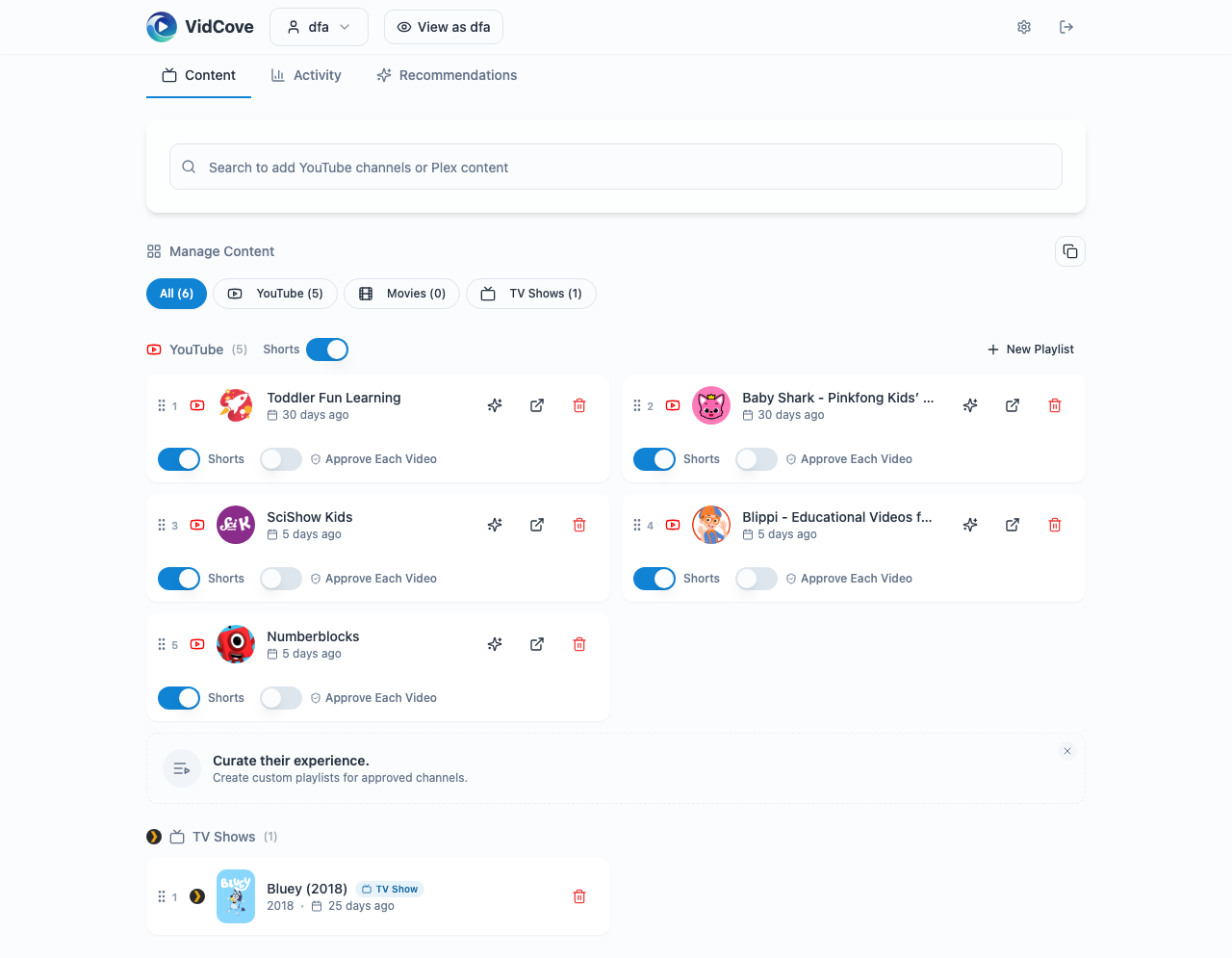
VidCove starts with the channels your child wants to watch. You can search for a YouTube channel, review it, and approve it for one child. That child can then browse and search within their approved library without the open YouTube feed, comments, or YouTube’s recommendation grid. You can block Shorts even on approved channels. If you enable channel requests, your child can ask for a new creator and wait for your approval.
Channel approval can include new uploads from that channel. If you only trust specific episodes, Premium’s Strict Mode lets you require approval at the video level. The YouTube Channel Safety Checker can help you review a channel, and you make the final call about what belongs. YouTube playback still depends on the source video being available and embeddable. How to build a parent-approved YouTube library.
Set a daily budget across devices
Imagine a child with a 30-minute VidCove budget who watches for ten minutes after breakfast. They have about 20 minutes left for later that day, whether they come back on a tablet or a supported TV. On Premium you can also give a particular channel or playlist its own daily budget. That’s handy when you want different rules for drawing tutorials and gaming videos.
When a VidCove budget runs out during playback, the current video can get a short grace period. You can review what each child watched and adjust their limits as their interests and routines change. VidCove’s screen-time features by plan.
What is Hank Green’s kids’ video app?
ClockwiseTV is an ad-free U.S. streaming app designed for ages 8–12. Its team licenses and reviews videos from creators and series such as Simone Giertz, Crash Course Kids, and SciShow Kids. ClockwiseTV picks which videos appear in the catalog and can edit them for younger viewers. ClockwiseTV’s creator lineup · TechCrunch’s interview with ClockwiseTV CEO Leslie Morgan.
A parent enters a PIN and chooses when the session ends. The app filters browsing and search by the time remaining, so a 15-minute video stays out of view when there are only eight minutes left. At the end of the session, a parent can unlock a new one. ClockwiseTV’s session rules.
Which app fits your family?
- One kid wants a specific drawing channel and their sibling wants a particular Minecraft creator. VidCove gives each child a separate library. Start by reviewing the exact channels they ask for and approve only the ones you want each child to have.
- The living room TV does most of the work. With a supported VidCove TV app, kids can browse their approved library with the remote. Check your TV model.
- You want a preselected educational catalog with a set end time for a tween. ClockwiseTV curates the videos and filters the session by time remaining.
- You already use YouTube Kids and its catalog covers what your child asks for. Try Google’s Approve content yourself setting. It lets you pick the videos, channels, and collections you want and turns off search. Google’s YouTube Kids parental controls.
Before picking an app, write down two creators or videos your child actually wants, the screen they use most, and how you want viewing to end. Those three details will tell you more than a long list of features. If you want to see what else is available, start with our comparison of YouTube Kids alternatives.
Build a library around your child’s favorites
Start with a few YouTube channels you trust, set a daily budget, and use the same approved library on a supported TV, tablet, or browser.
Get started with VidCoveFrequently asked questions
Is ClockwiseTV free?
It’s a subscription service. Its Help Center says new families may be offered a seven-day trial when they sign up in the app. As of November 23, 2026, its U.S. website advertised first-year launch pricing of $6.99 per month or $69.99 for the year for signups through November 30, 2026. It listed standard renewal prices of $8.99 per month or $89.99 per year. ClockwiseTV’s current pricing · Trial and billing terms.
Is ClockwiseTV available on smart TVs?
ClockwiseTV documents AirPlay screen mirroring to compatible smart TVs and Apple TV from an iPhone or iPad on the same Wi-Fi network. The sending device needs to stay unlocked. For a ClockwiseTV alternative that kids can browse with the TV remote, check the VidCove TV device list. ClockwiseTV’s supported devices.
Can I add my child’s favorite YouTube channel to ClockwiseTV?
ClockwiseTV’s team selects the catalog. Start with the official creator list, then search for the exact title or creator in the app with enough session time for the video to appear. If you want to build a library around that channel yourself, VidCove lets you approve it for your child. ClockwiseTV’s creator list.
What if my kids are younger or older than 8–12?
ClockwiseTV says children outside its target age range see picks from the closest end of that range. A seven-year-old sees the selection geared to eight-year-olds, for example. In VidCove, you can set up a different library for each sibling, using age-based starter suggestions or choosing your own channels. ClockwiseTV’s age guidance · VidCove’s guide to channels by age.